



Old to New Photo Restoration – HD Portrait Revived-gemini ai prompts
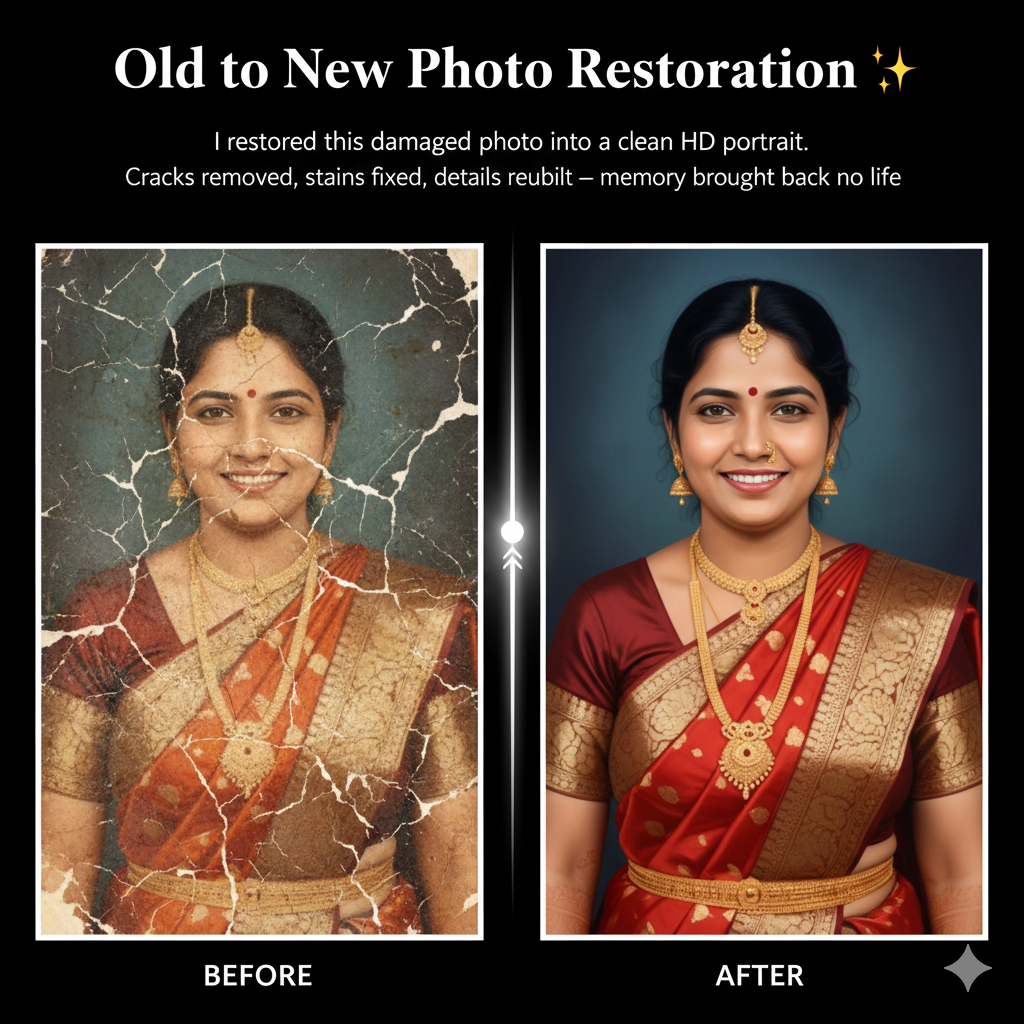
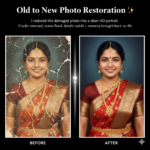
Old to New Photo Restoration ✨<br />
I restored this damaged photo into a clean HD portrait.<br />
Cracks removed, stains fixed, details rebuilt — memory brought back to life,
👁 26 |
❤️ 0 |
📋 0
💡 Tips (For Best Results)
1️⃣
Face photo → clear front view
Use a clear, well-lit photo with the face looking straight at the camera. Avoid side angles, blur, or low-light images.
2️⃣
Hair reference → side + front visible
The hairstyle reference image should clearly show:
- Front view
- Side view
This helps the AI understand the hairstyle accurately.
3️⃣
Use identity strength: HIGH
Keeps the original face exactly the same. Facial features like face shape, eyes, nose, lips, skin tone, and age remain unchanged.
4️⃣
Use style strength: MEDIUM
Applies the hairstyle naturally without over-stylizing. Prevents face distortion or unnatural results.
What the Prompt Does
This prompt is crafted to describe and generate an old-to-new photo restoration result with clarity and emotional depth. It communicates the transformation of a damaged, aged photograph into a clean, high-definition portrait while preserving the original essence of the memory. The prompt emphasizes careful restoration rather than over-editing, ensuring the final image feels authentic and respectful to the original moment.
By mentioning cracks removal, stain correction, and detail reconstruction, the prompt guides the process to focus on common forms of photo damage such as scratches, fading, discoloration, and torn areas. It ensures that facial features, expressions, and important visual elements are rebuilt with precision, resulting in a natural-looking HD portrait that feels timeless rather than artificially modern.
The phrase “memory brought back to life” highlights the emotional purpose of the restoration. This prompt is not only about technical improvement but also about reviving personal history, making the restored image feel meaningful, warm, and emotionally resonant.
Who Should Use This Prompt
This prompt is ideal for photo restoration artists, digital editors, and AI creators who specialize in reviving old or damaged photographs. It is especially useful for professionals working with family archives, heritage projects, and legacy preservation.
Individuals who want to restore ancestral photos, childhood memories, or vintage portraits can also use this prompt to clearly communicate their needs. Content creators, freelancers, and restoration service providers can include this prompt in portfolios or service descriptions to explain the value of their work in a simple and emotionally appealing way.
Use Cases
- Restoring old family photographs into clean HD portraits
- Reviving damaged wedding, childhood, or ancestral photos
- Creating before-and-after restoration showcases
- Portfolio content for photo restoration services
- Social media posts highlighting restoration transformations
- Archival and heritage preservation projects
- Memorial and tribute visuals for loved ones
FAQs
Q: Does this prompt preserve the original look of the photo?
Yes. The prompt focuses on restoring and enhancing the image while maintaining
the original facial features, expressions, and emotional authenticity.
Q: What types of damage can be fixed using this prompt?
Common issues such as cracks, scratches, stains, discoloration, fading, and
missing details are addressed through careful restoration and reconstruction.
Q: Will the restored photo look overly edited?
No. The prompt is designed to produce a clean and natural HD result without
excessive sharpening or artificial textures, keeping the image realistic.
Q: Is this suitable for professional and commercial use?
Yes. This prompt is suitable for professional restoration services, portfolios,
and commercial projects where high-quality, respectful restoration is required.
Q: Can this prompt be used for very old or severely damaged photos?
Absolutely. The emphasis on rebuilding lost details and reviving memories makes
it effective even for heavily damaged or aged photographs.
Share this content:
Post Comment